22 October 2018

How to enable Bitlocker on VM Workstation 14


Check if your Host machine has a Trusted Platform Module Enabled in your Device Manager.

clip_image002
Create new VM in VM Ware Workstation for Windows 10 64 Bit.
1. Dot not install the Operating System!
2. Goto Virtual Machine Settings
Enable UEFI and Enable Secure Boot
clip_image004
3. Goto Acces Control en click on Encrypt
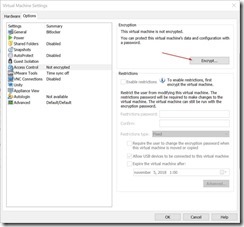
clip_image006
4. Enter a secure password and click on Encrypt
clip_image008
5. Goto Hardware TAB and click on Add button
clip_image012
6. Select Trusted Platform Module and click on Finish.
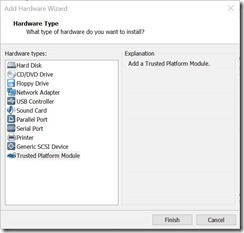
clip_image010

7. Click on Ok and start installing your Windows 10 Operating system
Continue here when your Windows installation has finished.

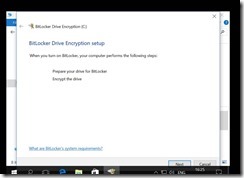
8. Logon to your VM and choose enable bitlocker
clip_image014

9. Choose where to save your recovery key

clip_image016

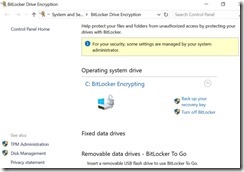
10. Bitlocker is encrypting
clip_image018
clip_image020

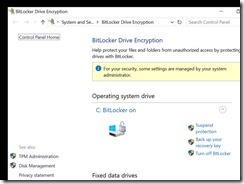
11. Bitlocker is ready

clip_image022

03 October 2012

WIM2VHD for Windows 8!

Back in the days of Windows 7 I played arround with a script called WIM2VHD. After installing WAIK for Windows 7 on your machine you
could use a powershell script to create a working VHD file for you. This VHD file could be used for Native VHD Boot or Virtual PC. This worked
very could, the only disadvantange was the 2GB download of the latest WAIK. Now with Windows 8 and Convert-WindowsImage.ps1 there is no need to that.
After installing windows 8, there are only two things that you need. Get a copy of Convert-WindowsImage.ps1 from http://gallery.technet.microsoft.com/scriptcenter/Convert-WindowsImageps1-0fe23a8f
and have an ISO or WIM file from Windows Vista/7/8/Server 2008/2012 avaiable.  Start the script with .\Convert-WindowsImage.ps1 -ShowUI and your off.

DISM 32 bit on Windows 8 64 Bit

Windows 8 has DISM included for management of your VHD or WIM files. There is no need for downloading the WAIK first.

I tried using it for updating my own drivers in an automatic way. If you have a Dell laptop, you can download a CAB file with all your drivers from  Dell TechCenter
After downloading the file i learned that DISM on my Windows 8 64 Bit laptop is actually a 32 bit version. Why is this?

image

16 November 2010

Microsoft .Net Framework installeren op Windows 7

Ga naar Start –> Alle programma`s –> Configuratiescherm –> Programma`s

image

Klik op toevoegen

image

Selecteer twee Microsoft .Net Framework componenten


image

Klik op OK en je bent klaar.

How to remove the Microsoft 6to4 Adapter on Windows 7

After searching the web for a long time I finally found a solution that worked for me.

Go to Start – > type cmd.exe –> Wait for search –> Run As Administrator. In dos box: Type interface 6to4 –> Enter Type in the following string: interface 6to4 set state state=disabled undoonstop=disabled –> Hit Enter

See screen below for the whole command line.

image

To check is everything is correct. Type Interface –> Enter. Type 6to4 –> Enter. Type show State –> Enter

6to4 Service State     : disabled
Undo on Service Stop   : disabled

image

16 June 2010

App-v ADM Template

Today Login Consultants released an App-V add-on ADM for App-V 4.6  32-bit AND 64-bit. Download for free (after registration) http://ow.ly/1ZcXF

How to upgrade an Imprivata G3 appliance to a G4 appliance?

1. What do you need? 2 running Imprivata Appliances  Imprivata appliance version 7.8 or higher (check Imprivata documentation for details) G...